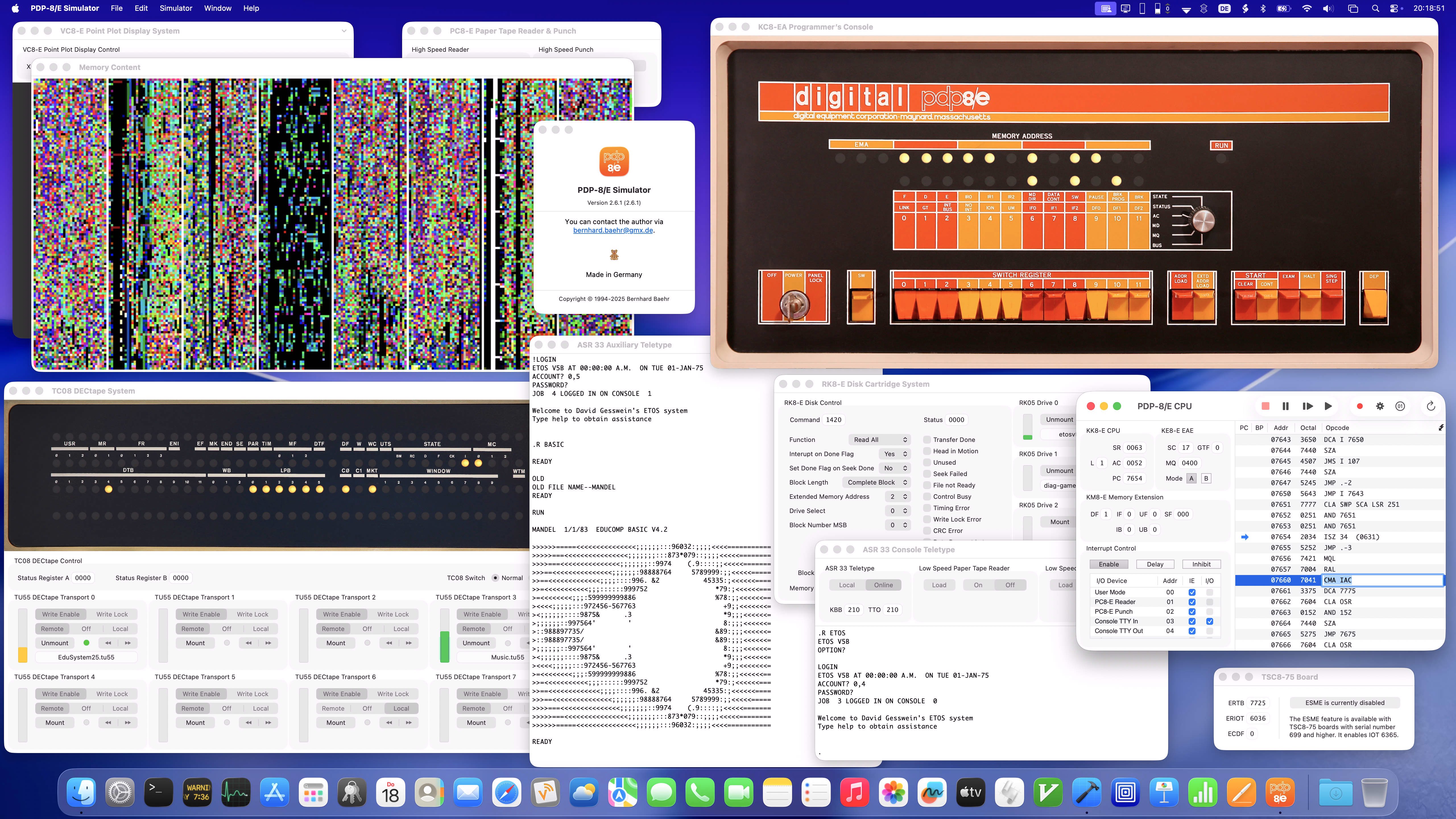
 This is the homepage of the PDP-8/E Simulator, an emulator for the
Digital Equipment PDP-8/E minicomputer running on the Apple Macintosh.
This is the homepage of the PDP-8/E Simulator, an emulator for the
Digital Equipment PDP-8/E minicomputer running on the Apple Macintosh.
The simulated machine is a PDP-8/E with 4K words of memory and optionally a KM8-E Memory Extension (with up to 32K words of memory) and a KE8-E Extended Arithmetic Element. I/O devices are implemented as plug-in modules, and the simulator contains plug-ins for an ASR 33 Console Teletype, an ASR 33 Auxiliary Teletype, a PC8-E High Speed Paper Tape Reader and Punch, a RK8-E Disk Cartridge System, a TC08 DECtape System and various Real Time Clocks.
There is also a KC8-EA Programmer's Console plug-in enabling the user to operate the simulator (nearly) like a hardware PDP-8/E, including single step execution on memory cycle level.
Furthermore, the simulator has a plug-in for the TSC8-75 board so that the emulated PDP-8/E can run the ETOS time sharing operating system.
A Music Player plug-in enables the PDP-8/E Simulator to make audible the music played with the PDP-8 Music Playing Program (DECUS 8-804), and a VC8-E Point Plot Display System plug-in allows the simulator to run Spacewar.
The simulator provides a comfortable user interface for running, writing and debugging PDP-8 software. For each device, there is a separate window which displays the internal state of the device. The user can view and edit the PDP-8 memory content as octal dump, assembler instructions and typed data (ASCII, integer, floating point, …).
Other features of the simulator are breakpoints, break opcodes, single step execution, a trace mode for the PDP-8/E and much more. The emulated ASR 33 Teletypes provide all comfort of Macintosh text editor windows and optionally produce the sound of hardware typewriters.
Benchmarks show that the PDP-8/E Simulator outperforms a hardware PDP-8/E in orders of magnitude when running on reasonable current Macs. There are options to slow down the CPU and the I/O devices to the speed of the real hardware. The simulator passes all of the most important MAINDEC hardware diagnostics for the PDP-8/E.
The plug-in API is included with the download, as well as a Memory Content demo plug-in that graphically shows the PDP-8/E memory content of the running machine. So you can implement your own plug-ins and PDP-8/E devices using Xcode and Objective-C or Swift.
PDP-8/E Simulator 2.6.1 runs on Macs with macOS X 10.13 “High Sierra” or newer and fully supports Dark Mode and Macs with Apple silicon. It is a Cocoa reimplementation of the version 1.x for the classic Mac OS that was first released in 1994. This version in turn is based on the PDP-8/E emulator of Bill Haygood (out-dated version from 1993). All three emulators use the same well-proven PDP-8/E emulation engine.
The simulator package includes some PDP-8 software, e. g. a complete OS/8 system, FOCAL-8 and Pascal-S, an EduSystem 25 DECtape and a PAL-8 compatible cross-assembler. There are tutorials for a quick start with the PDP-8/E Simulator and for operating the KC8-EA Programmer’s Console.
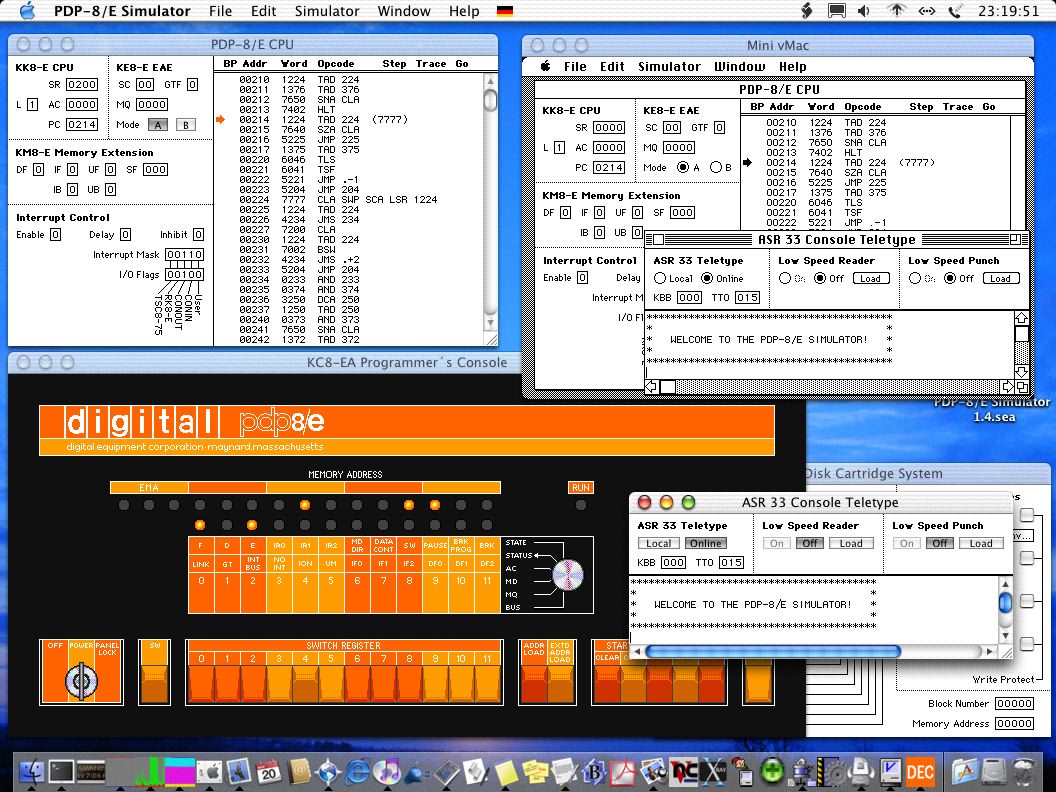
For old Macs, there is still PDP-8/E Simulator 1.5.1 available that runs on 68K-, PowerPC- and Intel-based Macs with System 2.0.1 to Mac OS X 10.6 “Snow Leopard”. The screenshot at the left shows the simulator simultaneously running on Mac OS X 10.2 “Jaguar” and on a Mac Plus with System 2.0.1. The Mac Plus “Mr. T” is emulated by Mini vMac. You can run this old version directly in your browser.
This is the quick start for PDP-8/E Simulator 1.x.
Note that PDP-8/E Simulator 1.x and the I/O devices can completely be controlled using AppleScript.
Read the history of the PDP-8/E Simulator and some user feedback.
Here are some links to other PDP-8 related resources.
The PDP-8/E Simulator is published under the conditions of the
GNU General Public License.
Downloads
This is the most current version of the PDP-8/E Simulator.
The download includes all binaries, some PDP-8 software, the plug-in API and the source code for the simulator:
| Bernhard Baehr | 03.04.2026 23:15:00 |